Contents8 sections
CEDIA RP32 is what turns a finished room from an opinion into a verdict. For most of the history of custom installation the deliverable at handover was a sentence — the room sounds great — backed by the integrator's reputation and very little else. Two CEDIA/CTA recommended practices changed that. RP22 defines what a room should achieve. RP32 defines how you prove it did. XSCACE builds both halves into software that is free to use: the design half in Floorplan Sound Simulation, and the verification half in XSCACE Studio.
What CEDIA/CTA-RP22 changed
CEDIA/CTA-RP22, the Immersive Audio Design Recommended Practice, was the first document in this industry to replace subjective labels with measurable ones. Before it, systems were sold as good, better and best — a scale with no units, where two integrators quoting the same room could both be telling the truth and mean entirely different things. RP22 defines four performance levels against engineering criteria, so a client, a designer, an integrator and a manufacturer can point at the same row of the same table and mean the same thing. It covers speaker layout for immersive formats as well, which is why an RP22 conversation properly starts on the floor plan rather than at commissioning.
The practical consequence is that “what level is this room?” becomes a specifiable question at the quoting stage. A Level 2 room and a Level 4 room differ in ways that show up directly in the bill of quantities — headroom, channel count, seat-to-seat consistency, and how quiet the room itself has to be. RP22 is what lets those differences be priced honestly up front rather than argued about at handover.
What CEDIA RP-32 adds
RP22 on its own leaves a gap: a room can be designed to Level 3 and delivered at something else entirely, and nothing in the design document catches it. CEDIA RP-32 — Audio System Measurement and Verification — closes that gap. It sets out repeatable procedures for measuring audio performance in consumer entertainment spaces, and it incorporates verification against RP22's performance parameters, so an integrator can demonstrate whether the finished room actually reached the level it was designed to.
This is a different job from room correction, and the distinction matters. Correction changes the system. Verification judges it. You can have an exhaustively corrected room that still misses Level 3 on background noise, because no amount of equalisation makes an air-conditioning duct quieter — and only a verification pass will tell you that before the client does.
Designing to the level: Floorplan Sound Simulation
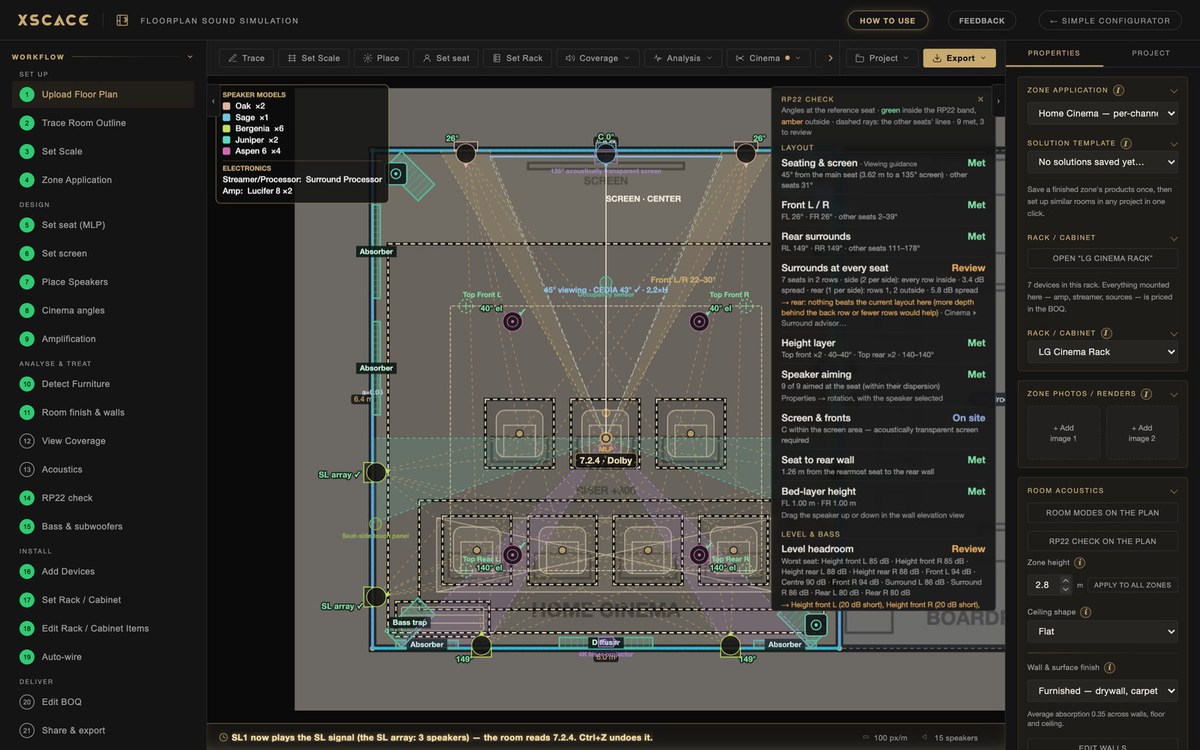
RP22's layout parameters — speaker angles, seat positions, speaker counts — are design values. They are decided on a drawing long before a microphone comes out of the case, and they are the parameters a verification pass cannot retrospectively fix. Floorplan Sound Simulation is where those decisions get made with something better than instinct: trace the room, place the speakers, and the tool resolves the cinema layout against Dolby's reference angle wedges, checks the stereo imaging angle against the 45–60° target, predicts coherent SPL across the floor with real interference between sources, flags axial, tangential and oblique room modes to 200 Hz with booms and nulls at the seat, and draws the first-reflection points on each wall.
It does not print an RP22 level on the front page, and it should not — a level is something a finished room earns by measurement. What it does is stop the layout being the reason the room fails later. Per-wall acoustic properties and placed treatment recompute the coverage as you go, so a glazed elevation and a curtained one stop being the same surface in the model, and the bill of quantities that falls out the far end reflects the room you actually drew.
Proving the level: the RP32 checklist in XSCACE Studio
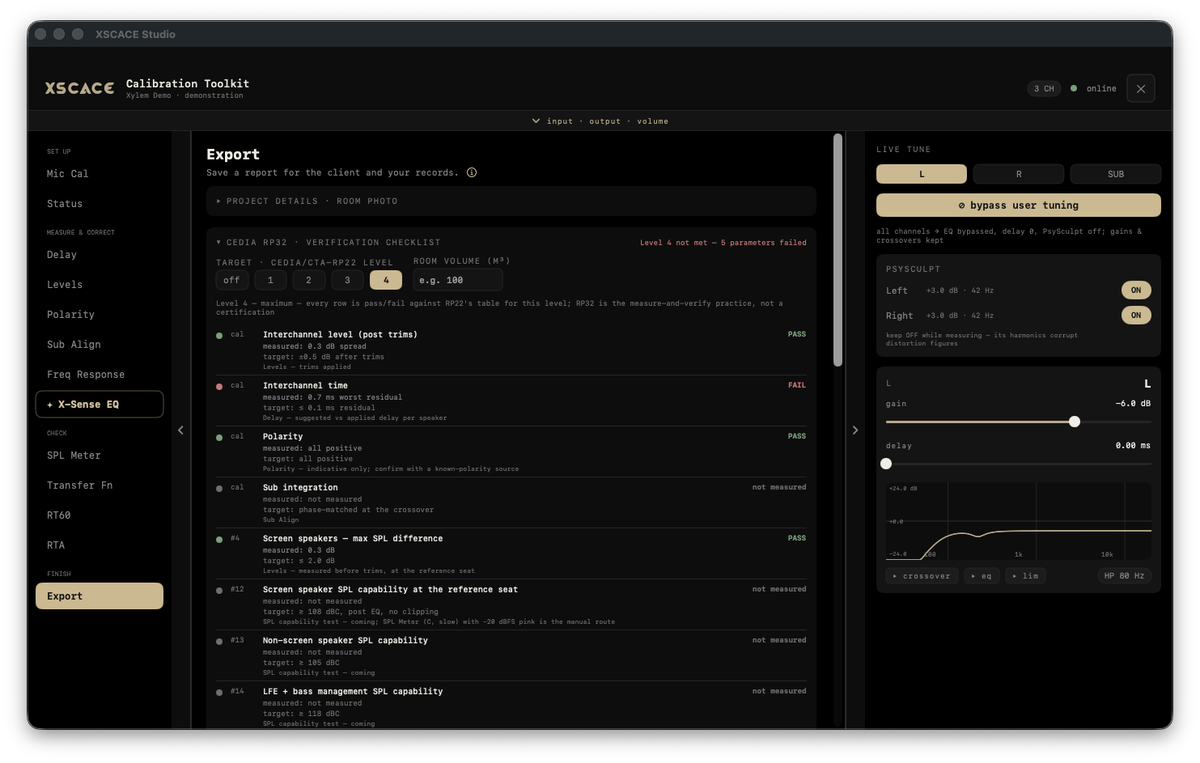
XSCACE Studio carries the verification half. On the Export page, the CEDIA RP32 verification checklist asks for two things: the CEDIA/CTA-RP22 level the room was designed to, from 1 to 4, and the room volume in cubic metres. From there every parameter is judged against RP22's table for that level, and each row states four things — what was measured, the target it is held to, which instrument produced it, and a plain pass or fail.
The verdict sits at the top of the section in the same language the integrator will have to use with the client: "Level 4 not met — 5 parameters failed." There is no rounding a near miss up to a pass, because a checklist that flatters the installation is worth nothing to the person who has to stand behind it.
What the RP32 checklist judges
The rows fall into three groups: calibration parameters carried straight from the commissioning instruments, SPL capability parameters, and room parameters derived from the measured responses.
- Interchannel level after trims — held to ±0.5 dB spread, from the Levels instrument
- Interchannel time — held to a 0.1 ms residual, from the Delay instrument's suggested versus applied delay per speaker
- Polarity — all positive, flagged as indicative and to be confirmed against a known-polarity source
- Sub integration — phase-matched at the crossover, from Sub Align
- Screen-speaker maximum SPL difference at the reference seat, measured before trims
- Screen, non-screen and LFE/bass-managed SPL capability — post-EQ, with no clipping
- Background noise floor — expressed as an NCB rating with its limiting band, everything running and nothing playing
- Seat-to-seat response variance for screen speakers, 500 Hz–16 kHz, per seat
- Seat-to-seat response variance for surround and upper speakers, per seat
- Seat-to-seat variance below the transition frequency, per seat
- In-room bass extension at −3 dB, relative to the 60–200 Hz mean across the bass-managed channels
- Response below the transition frequency — ⅓-octave, deviation from a flat target after removing the mean, at the reference seat
- Early reflections against direct sound — 0–15 ms after the direct arrival, 1–8 kHz energy ratio
- Reflection decay time — ISO 3382-1 T20 by the Schroeder method, averaged across the measured channels, against a target derived from the room volume
A worked example
The sample calibration report linked at the top of this article is a real Studio export judged against Level 4, the maximum, and it returns "Level 4 not met — 5 parameters failed." The five are worth reading as a group. Interchannel time came back at 0.7 ms worst residual against a 0.1 ms target. Background noise measured NC-65. In-room bass extension reached 45 Hz where Level 4 asks for 18 Hz. Response below the transition frequency measured ±6.2 dB worst against ±2.0 dB. Early reflections sat at −2.3 dB against a −10 dB target.
Four of those five are the room rather than the system, which is precisely why the check is worth running. Background noise at NC-65 is plant and building fabric. Bass extension to 45 Hz where the level wants 18 Hz is a subwoofer and placement question. ±6.2 dB below the transition frequency is modal behaviour. Early reflections at −2.3 dB against a −10 dB target is a surface-treatment question. Only the interchannel time residual is something to fix in the DSP — and without the checklist, it is the only one of the five most integrators would have caught. Run the same room against Level 3 instead and the noise floor passes: the targets tighten with the level, which is the whole point of having levels.
What the checklist does not claim
Three limits are printed on the same screen as the results, deliberately. Parameters requiring a test the current version does not run are marked “not measured” rather than estimated or interpolated. Layout parameters 1–11 — speaker angles, seating, speaker counts — are design values read from the room plan, and are labelled as design values rather than presented as measurements. And the report states in as many words that this is measurement to RP32 practice, not a certification.
That last point deserves emphasis rather than small print. Software does not certify anything. What this produces is a defensible, repeatable measurement against a published table, documented so that someone else can check the working — which is what RP32 is for.
Where it fits in the commissioning workflow
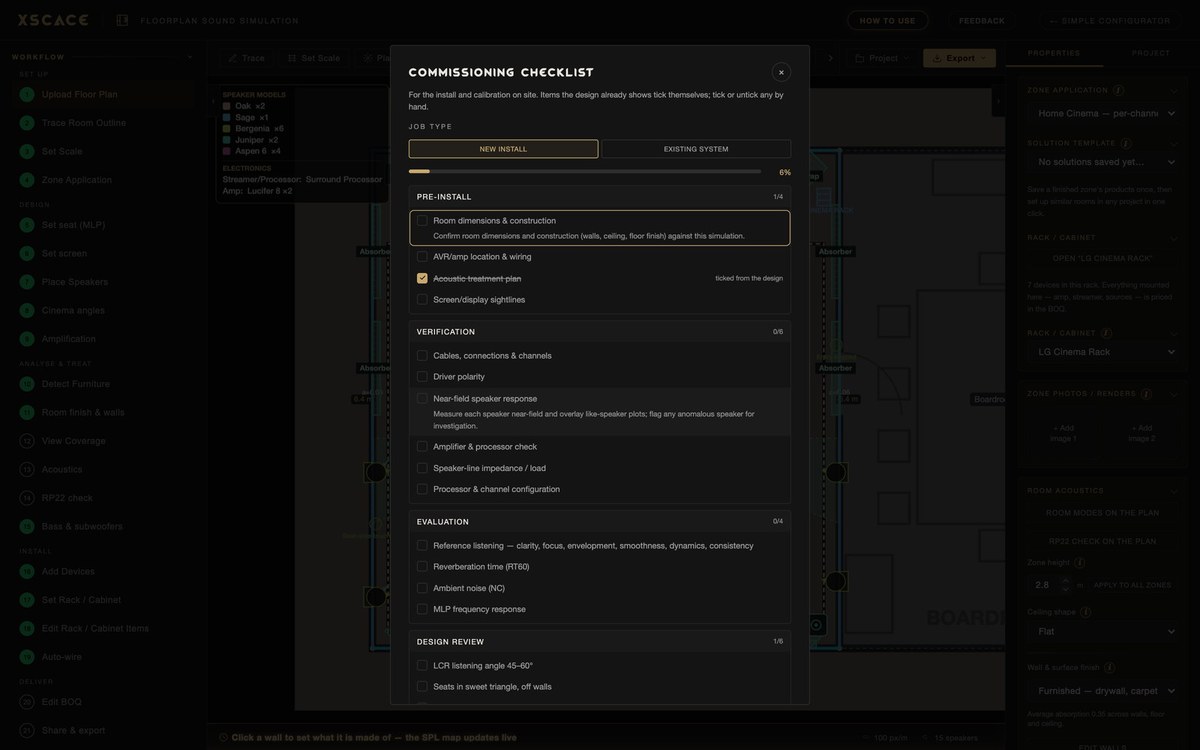
The order is the same every time, and the checklist belongs at the end of it: confirm routing and polarity, load the preset matched to the speaker model, run room correction per zone, time-align to the primary seat, then verify. Running verification earlier only tells you the room is not finished yet. The full sequence is set out in how every XSCACE installation is wired, controlled and calibrated, and the instruments themselves in the audio calibration software guide.
The checklist then carries into the exported client PDF as its own numbered section, sitting alongside the measurement results, the applied tuning, the per-channel assessment, the room acoustics checks and the graphs that back all of it. That is what changes the handover document: instead of curves the client has no way to read, it states the level the room was designed to, every parameter it was judged against, and exactly which ones it met.
This is also the clearest practical difference between a commissioning tool and a measurement tool. Smaart and REW will both give you an accurate response, an impulse and a decay time, and neither will tell you whether the room passed, because neither holds the criteria to judge it against. The decay figure itself is a good illustration of why the underlying rigour matters — what it took to measure reverberation time defensibly is a longer story, and reflection decay time is one of the rows above. Terms used here are defined in the architectural audio glossary.
To see the document itself, download a sample XSCACE Studio calibration report (PDF, 14 pages) — summary, measurement results, applied tuning, the CEDIA RP32 verification table, per-channel assessment, room acoustics checks, graphs, and the microphone and method notes. It was generated in demo mode, so every figure is synthesised; the format is the one every job ships with.