Contents15 sections
For an AV integrator the bill of quantities is the document the whole job hangs off. It is what the client approves, what the estimator prices, what the installer orders against, and what you get held to when something is missing on site. Building it by hand from a floor plan is slow, and — more expensively — it goes stale the moment the design changes. This guide covers what belongs in an audio BOQ, why manual ones drift, and how to generate one directly from the acoustic design so the two cannot disagree.
What Belongs in an Audio BOQ
- Speaker model and quantity, broken down per room or zone — not just a project total
- Amplifier channel count required to drive every zone, matched to real power specs
- Subwoofer count and placement, since bass coverage is rarely one-per-room
- Accessories — brackets, grilles, finish options — tied to the exact SKU, not a generic line item
| Field | Why it matters | Where it comes from |
|---|---|---|
| Product and SKU | A generic "in-ceiling speaker" cannot be ordered or priced | The catalogue entry placed on the plan |
| Quantity per zone | Project totals hide which room is short | Counted from what is on the plan, zone by zone |
| Zone and floor | The installer needs to know where it goes | The Floors → Zones project structure |
| Amplifier channels | Channel count, not box count, is what constrains a design | The electronics assigned per zone |
| Subwoofer count | Bass coverage is rarely one per room | Placed separately from the main speakers |
| Cable length | Usually the line most often guessed | Estimated from the rack position to each speaker |
| Accessories | Brackets, grilles and finishes are real cost | Tied to the specific SKU, not a generic allowance |
| Unit price | A BOQ without prices is only half a quote | Your saved price list, or filled in via Excel |
The distinction that matters is between a list and a schedule. A list says the project needs fourteen speakers. A schedule says which four go in the living room, which two in the kitchen, on which floor, driven by which amplifier channels, with how much cable. Only the second one can be ordered against and installed from.
Revision Three Is Where Money Is Lost
Almost nobody gets a BOQ wrong on the first pass. It goes wrong on revision three, when the client has moved a wall, swapped a model for budget and added an outdoor zone — and somebody has to remember to reflect all of that in a spreadsheet that has no idea the design changed.
| Change on site | Spreadsheet BOQ | Design-linked BOQ |
|---|---|---|
| Client moves a zone boundary | Recount that room, edit two files | Redraw the zone; schedule follows |
| Swap a speaker model for budget | Find every line, update SKU and price | Replace on the plan; totals update |
| Add a subwoofer late | Add a row, remember the amp channel | Place it; channels and cable re-derive |
| Rack moves to another room | Re-guess every cable length | Move the rack; lengths re-estimate |
| Add a whole floor | New sheet, re-tally project totals | Add the floor; totals roll up |
The pattern is always the same: the design and the document are maintained separately, so they diverge silently. Nobody notices until the installer is short two speakers or the client queries a line that was deleted a fortnight ago. Generating the BOQ from the design removes the class of error entirely, because there is only one thing to update.
Why Manual BOQs Break
A BOQ built in a spreadsheet is disconnected from the design the moment it's typed. Move a speaker, add a zone, or swap a model for budget reasons, and the spreadsheet doesn't know — someone has to remember to update it, on every revision, across every room. Worse, a manually-built BOQ usually isn't grounded in an actual coverage prediction: quantities come from rules of thumb ("one speaker per 15m²") rather than a simulation that accounts for room modes, reflections and real dispersion. The list can be internally consistent and still be wrong for the room.
From Floor Plan to Bill of Quantities, Automatically
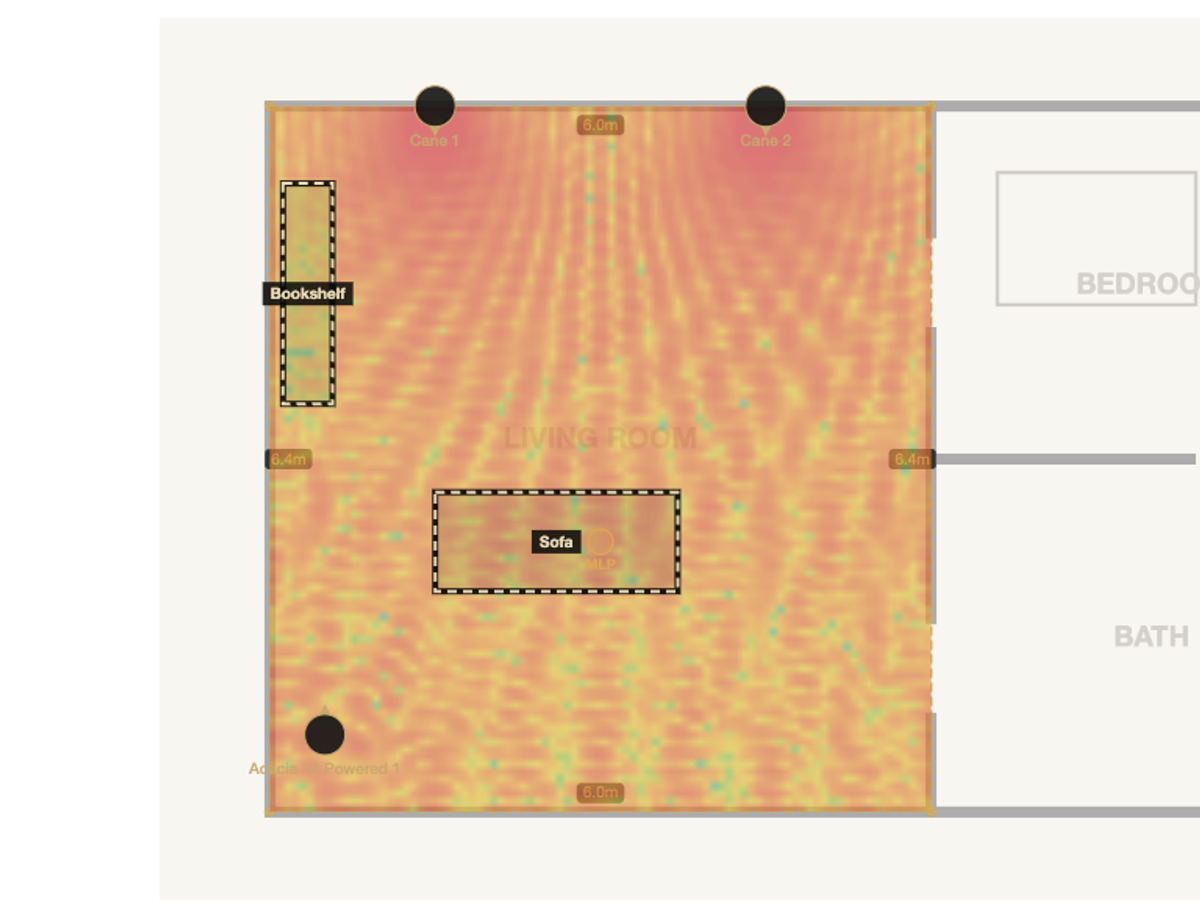
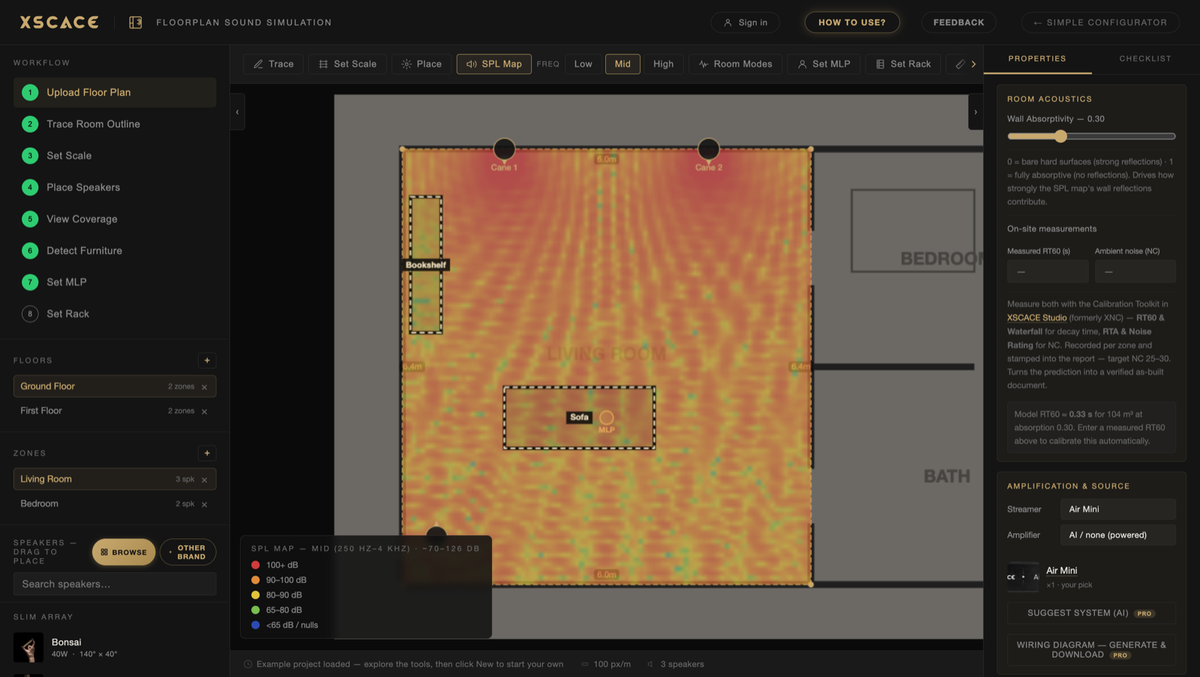
Because the BOQ is assembled from the design rather than typed up afterwards, it cannot drift out of step with it. Move a speaker to a different zone and the schedule follows. Add a subwoofer and it appears in the totals. Place the rack and cable lengths are estimated from its position and folded in.
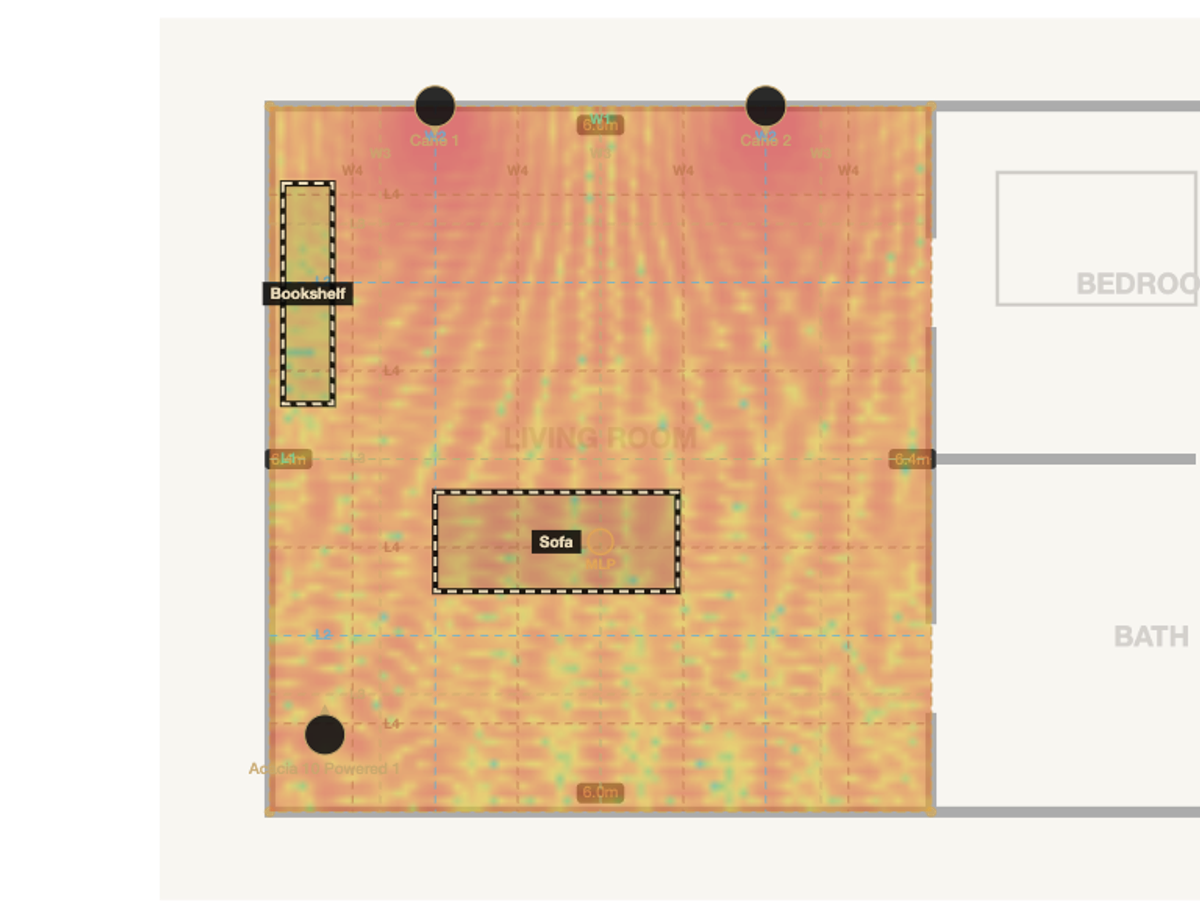
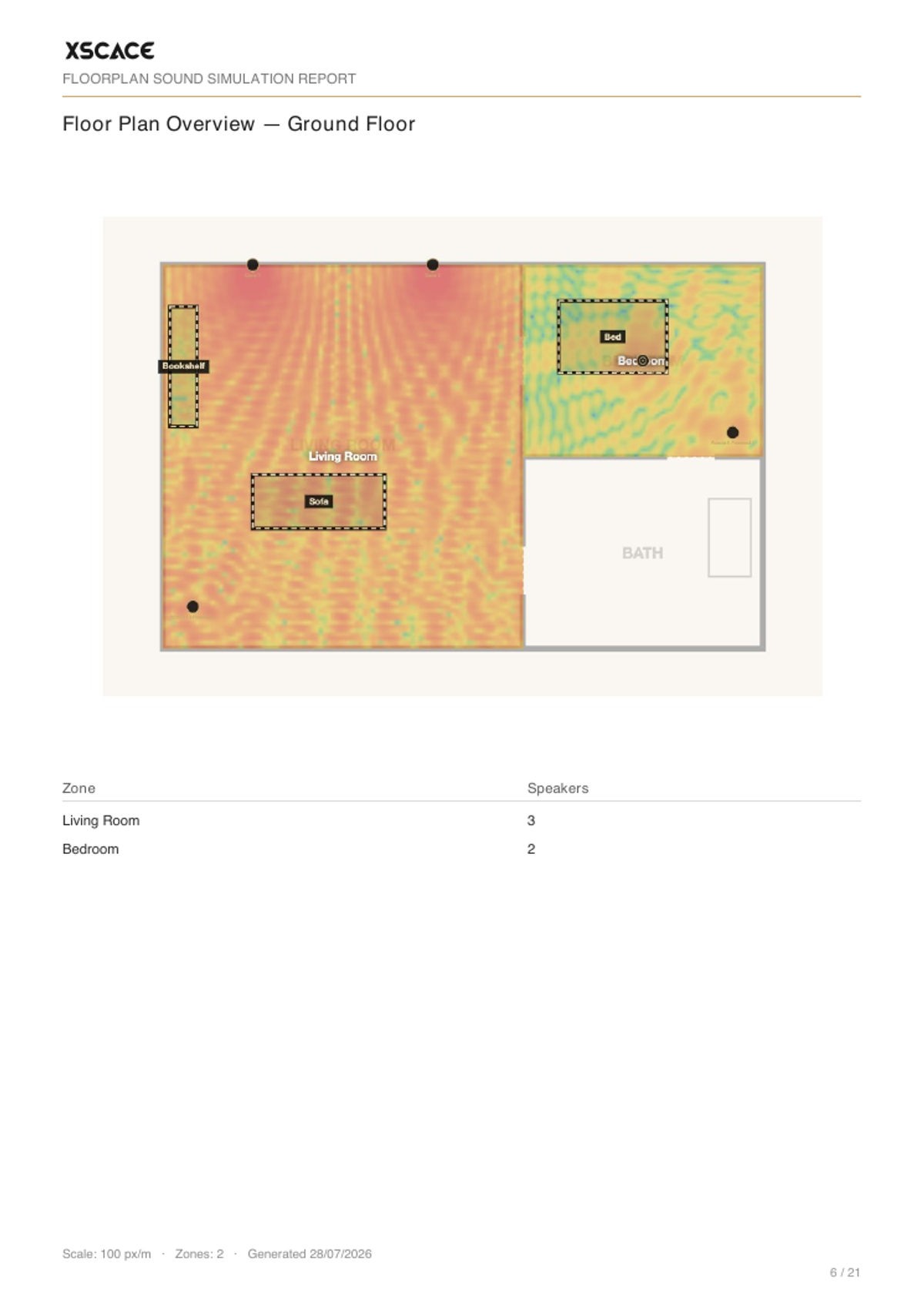
Trace the room outline on an uploaded floor plan, set the real-world scale, and drag speakers onto it from the actual XSCACE catalogue — each one carrying its real sensitivity, power handling and dispersion data. As the coverage heat map updates live, the tool is simultaneously counting exactly what's been placed, zone by zone. There's no separate step where someone transcribes the design into a bill of quantities — the BOQ is a direct export of what's actually on the plan, so a design revision and a BOQ revision are the same action.
One Project, Every Zone, One Set of Totals
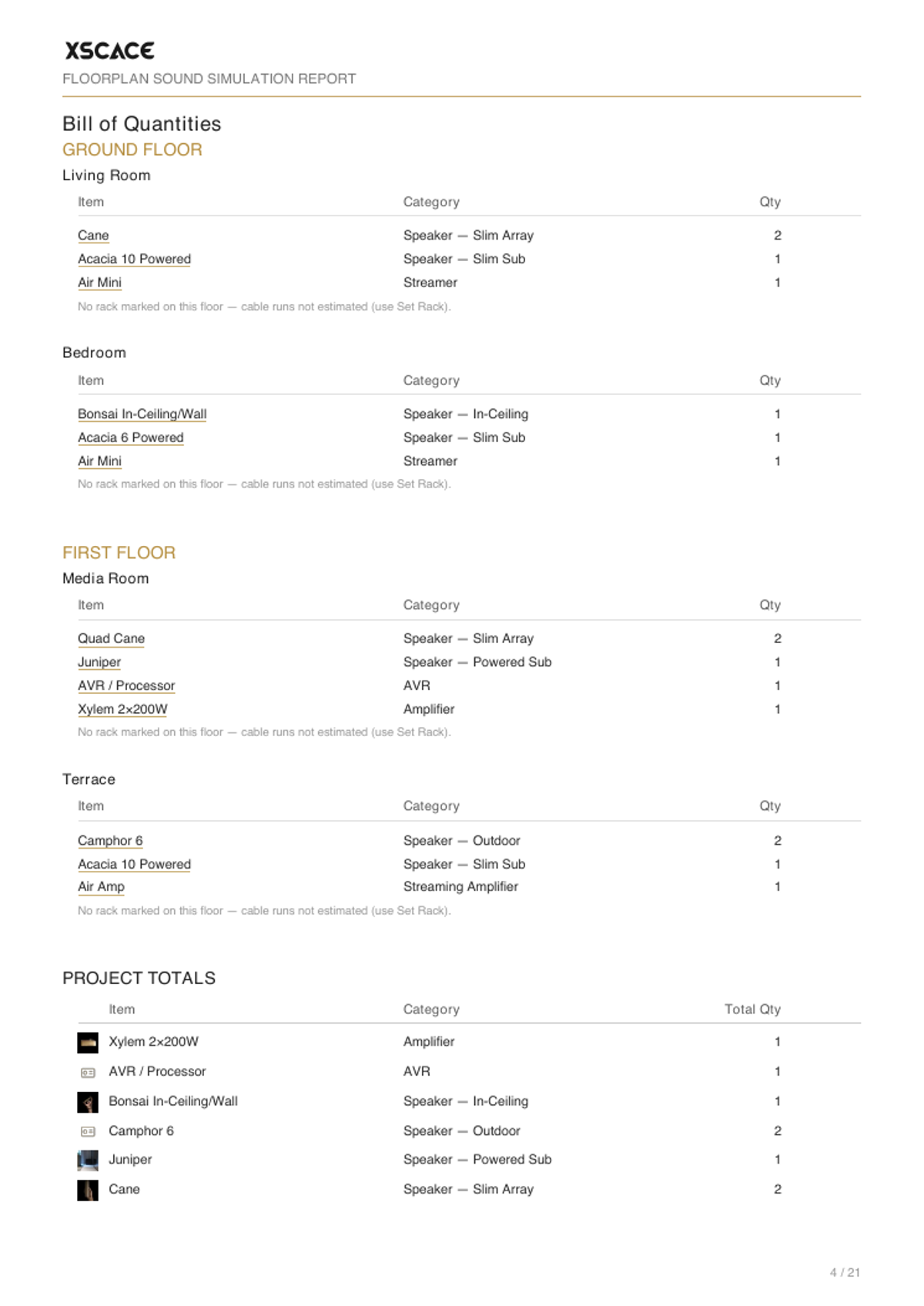
A real project is rarely one room. Projects are structured Floors → Zones, so a whole villa, apartment or commercial fit-out lives in a single file — every floor gets its own plan and scale, every zone gets its own SPL map and speaker schedule. On export, the BOQ doesn't stop at one room's totals: it rolls every zone on every floor into one set of project-wide numbers, the same document a client signs off on for the whole job, not a stack of per-room spreadsheets stapled together.
What the Export Actually Contains
- A branded Excel quotation spreadsheet with live totals, ready to send to a client
- An indexed PDF report with a cover page and clickable table of contents
- A music zone on one page with its combined SPL map, technical details and signal-flow diagram
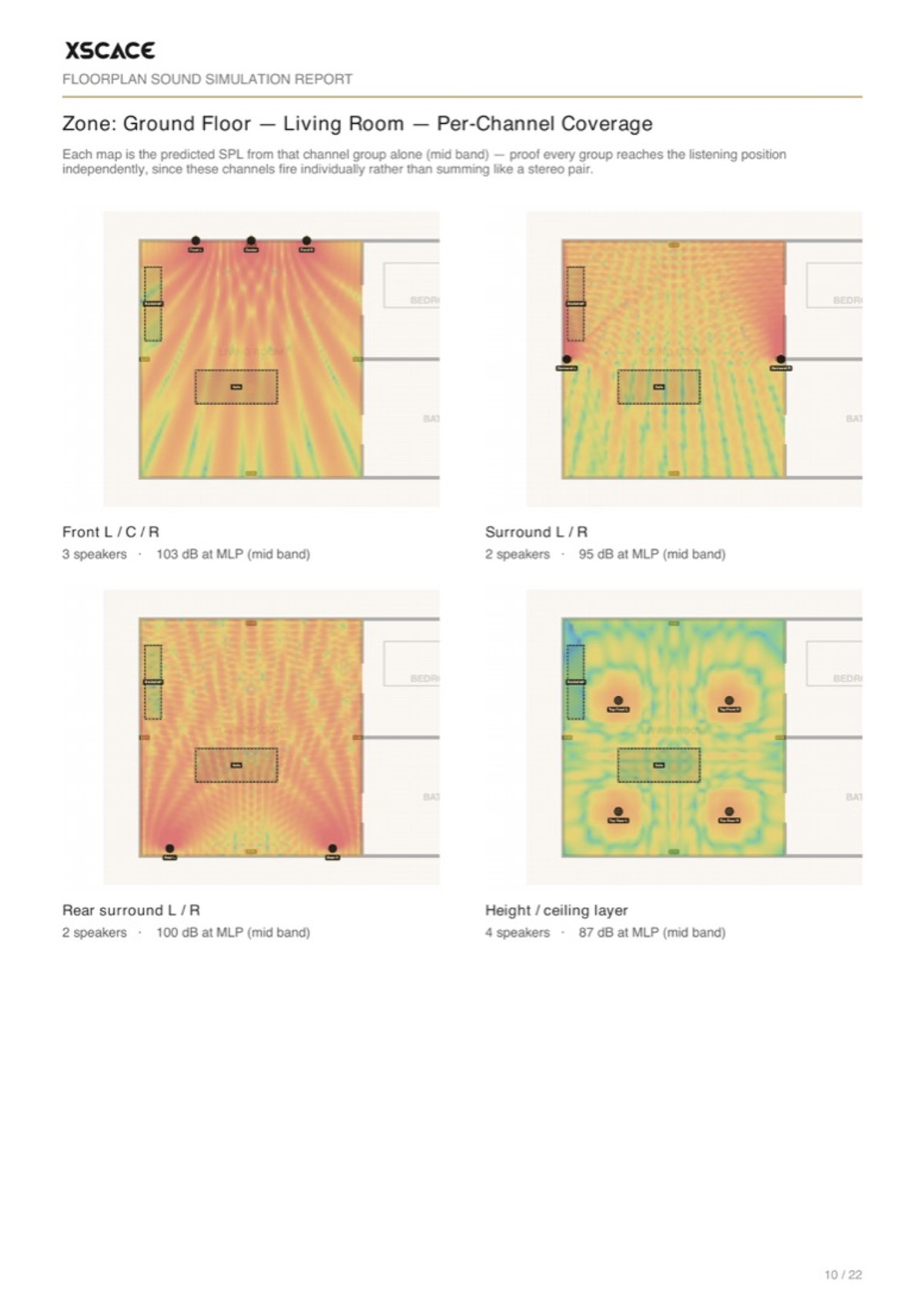
- A cinema zone as a page per channel group — front L/C/R, surrounds, rears and the height layer — with the Dolby angles, screen bearing and seat position written in
- 3D views and a phase-based commissioning checklist for the install crew
| Export | Format | Best for |
|---|---|---|
| Bill of quantities | In-app, per floor and zone | Checking the design as you build it |
| Quotation | Excel (.xlsx) | Adding your prices — round-trips back in by a hidden ID column |
| Client report | PDF, ~21 pages, ~1 MB | The document the client signs off |
| Signal flow & wiring | In the PDF report | The installer on site |
| Commissioning checklist | In the PDF report | Proving the install was completed properly |
Where a Bill of Quantities Becomes a Quotation
A bill of quantities lists what goes in. A quotation is what a client agrees to, and the gap between the two is usually where an integrator loses an afternoon — the parts list is exported, opened in a spreadsheet, and then rebuilt by hand with discounts, labour, tax and terms bolted on. Every one of those rebuilds is a chance for the numbers to stop matching the design.
Those fields now sit on the same screen as the design, so the document that leaves is the document that was priced.
| Field | What it does | Why it matters |
|---|---|---|
| Unit price | The rate per line, from your saved price list | Nothing is retyped, so revision three cannot drift from revision one |
| Discount | Applied per line or across the order | A concession stays visible instead of being buried in a reduced unit rate |
| Labour | Priced alongside the equipment | Installation stops being the number argued about after the client has committed |
| Tax | Calculated on the subtotal | The figure the client sees is the figure they pay |
| Round-off | Adjusts the final total | A quotation ends on a considered number rather than an arithmetic accident |
| Custom specification | Your own wording per line | The client reads what the speaker does for them, not the catalogue description |
| Optional lines | Priced, but held out of the total | An upgrade can be shown without inflating the number being compared |
| Terms & prepared-by | Closing detail on the document | It reads as a company quotation rather than a spreadsheet export |
One structural choice is worth making deliberately: the whole thing groups either by room or by category. Group by room when the client is reading it, because that is how they experience the house — the cinema costs this, the terrace costs that, and a line can be cut without unpicking the rest. Group by category when the installer is ordering from it, because nobody buys cable room by room.
Three Ways to Build an Audio BOQ
Most integrators arrive at a bill of quantities one of three ways, and the difference is less about features than about whether the document stays true to the design after the third revision.
| Spreadsheet by hand | Generic estimating software | Floorplan Sound Simulation | |
|---|---|---|---|
| Grounded in a coverage prediction | No — rules of thumb | No | Yes — quantities follow the simulation |
| Survives a design revision | Only if someone remembers | Partly | Yes — the design is the BOQ |
| Per-zone breakdown | Manual | Usually | Automatic, per floor and zone |
| Real product specs behind quantities | Whatever was typed | Generic catalogue | Sensitivity, power and dispersion from the catalogue |
| Cable estimation | Guessed | Sometimes | From the placed rack position |
| Client-ready PDF with coverage maps | No | Rarely | Yes |
| Cost | Free | Paid | Free; Pro for branding and price lists |
The honest limitation of the third column: it only knows the products in its catalogue, plus whatever third-party equipment you add yourself. A generic estimating package covers trades far beyond audio. If you are pricing a whole building, this is one input to that process rather than a replacement for it.
Four People Read This Document
An audio BOQ is not one deliverable — it is the same underlying data presented to four audiences with different needs. Exporting once and reformatting by hand for each of them is where the afternoons go.
| Reader | What they need | What the export gives them |
|---|---|---|
| Client | Confidence and a price | Branded PDF with coverage maps, 3D view and totals |
| Your estimator | Editable line items | Excel quotation that re-imports without breaking links |
| Installer on site | What goes where, and wiring | Per-zone schedules, signal flow, rack layout, cable lengths |
| Commissioning engineer | What was promised | Per-zone targets to measure against in XSCACE Studio |
The per-zone breakdown is the part installers care about and the part hand-built BOQs most often skip. A project total of eleven speakers is useless on site; four in the living room, two in the kitchen, two outdoor and three upstairs is a work instruction.

Your Prices, Your Currency, Your Branding
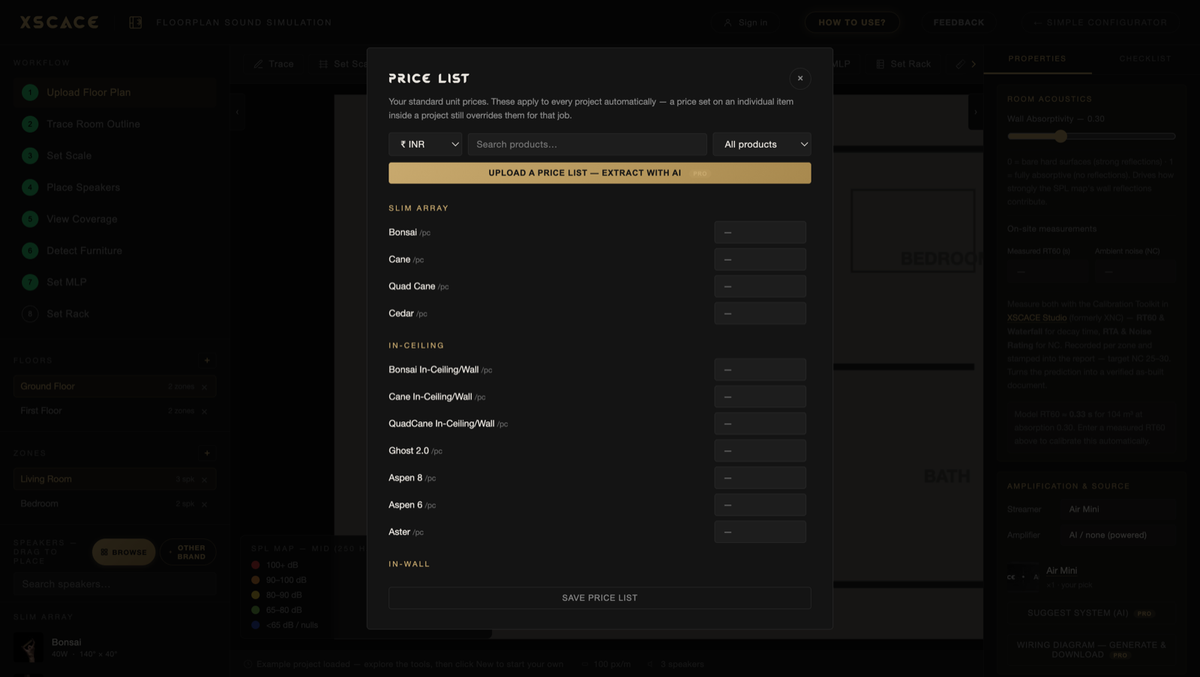
A bill of quantities without prices is only half a quote. Set your standard unit prices once as a saved price list and they apply to every project automatically, in any of twelve currencies, shown consistently on the bill of quantities, the PDF report and the Excel export. If your distributor sends a price file, the AI price-list import reads a PDF or spreadsheet straight into matched prices rather than making you retype it.
| Feature | Tier | Detail |
|---|---|---|
| Bill of quantities | Free | Per floor, per zone, with project totals |
| Excel export and re-import | Free | Fill prices offline, re-import cleanly |
| Client PDF report | Free (3/month) | Unlimited on Pro |
| Saved price list | Pro | Your standard unit prices on every project |
| Multi-currency | Pro | Twelve currencies across BOQ, report and Excel |
| AI price-list import | Pro | Reads a distributor PDF or Excel into matched prices |
| Your logo on exports | Pro | PDF report and Excel quotation |
If you would rather work offline, the Excel export round-trips: fill in prices in the spreadsheet, re-import it, and the tool matches every line back to the right product through a hidden ID column rather than by name matching that breaks the moment someone edits a cell.
When One Zone Needs More Than One Amplifier
A 7.1.4 room does not run off a single amplifier, and an audio BOQ that assumes it does will be short by a chassis. A zone can now carry as many amplifiers as the design needs, each with its own quantity — typically one multi-channel amplifier for the bed layer and a second for the height layer. Every one of them appears in the bill of quantities and in the signal flow, so the count that reaches the quotation is the count that reaches the rack.
Powered subwoofers are handled the same way rather than as an exception. Where a subwoofer drives its own satellites — the Acacia 10 has a two-channel speaker output, the Banyan Pith a mono output — the BOQ reflects that those channels are already accounted for, instead of adding an amplifier nobody will buy.
| Before | Now |
|---|---|
| One amplifier per zone | As many as the design needs, each with a quantity |
| Height layer counted against the bed amplifier | Its own amplifier line, its own channel count |
| Powered subs quoted with a separate amplifier | Their own speaker outputs counted as drive |
| Cable estimated at one gauge | Tallied by the gauge pinned to each speaker |
Cable Tallied by the Gauge You Actually Specified
Cable is the line item that quietly eats margin, because it is estimated once and then specified differently on site. Each speaker can be pinned to 12, 14 or 16 AWG — or left automatic — and the bill of quantities tallies cable by the gauge chosen rather than assuming a single figure across the job. A long run to a terrace pair and a short run to a ceiling pair stop sharing one number.
Prices Default to Dollars, Not to an Assumption
Unit prices are saved once and applied to every project, in any of twelve currencies, across the bill of quantities, the report and the spreadsheet export. Prices now default to US dollars and follow whichever currency the price list is in, rather than assuming a home market — which matters when the same design is quoted from Dubai, Bangkok and Toronto in the same week.
Bill of Quantities Terms, Defined
AV projects borrow BOQ vocabulary from construction, and the same words are used loosely enough to cause real confusion on site. These are the ones this guide relies on.
| Term | What it means |
|---|---|
| BOQ | Bill of quantities — the itemised list of everything a project needs, by quantity and location |
| Schedule | The per-zone breakdown of that list; a speaker schedule is the speakers for one zone |
| Zone | One controllable audio area — a room, or part of a large room, with its own source and level |
| Home run | A cable run going straight from the rack to one speaker rather than daisy-chained |
| Rack elevation | The vertical layout of equipment in the rack, used to plan space and ventilation |
| Signal flow | The diagram showing what feeds what, from source through processing to speaker |
| Commissioning checklist | The phase-by-phase list proving the install was completed and verified |
| Round-trip | Exporting to Excel, editing, and re-importing without breaking the link to each product |
Audio BOQ Software at a Glance
- Free and browser-based — the BOQ and Excel export need no account
- Quantities follow the acoustic simulation rather than a rule of thumb
- Per floor and per zone, rolled into one set of project-wide totals
- Cable lengths estimated from the placed rack position
- Excel export round-trips your prices through a hidden ID column
- Saved price lists in twelve currencies, with AI import from a distributor file (Pro)
- Client PDF report with per-zone coverage, signal flow and a commissioning checklist
- Your branding on the PDF and the spreadsheet (Pro)
Try the full workflow on the Floorplan Sound Simulation page, or read the full product walkthrough for the acoustic side of the simulation. For the short version of the whole workflow, read from floor plan to quote in one afternoon.