Contents8 sections
There are two kinds of home theater design tool, and the split is sharper than it looks. One kind is free, lives in a browser, and draws your room in 3D so you can see where the speakers go. The other is subscription software for custom integrators that produces drawings and documentation a contractor can build from.
Both are useful. Neither tells you what the room will actually sound like, because neither predicts the sound field — and that is the thing that decides whether a cinema works.
What each kind of tool is for
Taking the ones people actually use:
- Audio Advice Home Theater Designer — free, browser-based, 3D. Room dimensions, seating rows and risers, display choice, and it returns speaker angles up to Atmos layouts along with throw distances. It is the most recommended free consumer tool in the category and deserves to be: for one room, with one person planning it, it is genuinely good and costs nothing.
- The Cinema Designer — subscription software aimed at professional integrators. Its strength is documentation: automated drawings and specifications that turn a design into something installable and quotable.
- Dreamedia's design tool and AudioHorn's GeoGebra layout planner — lighter-weight geometry tools. AudioHorn's in particular positions speakers, screen and subwoofers against published Dolby and SMPTE references, which is more rigour than a visualiser.
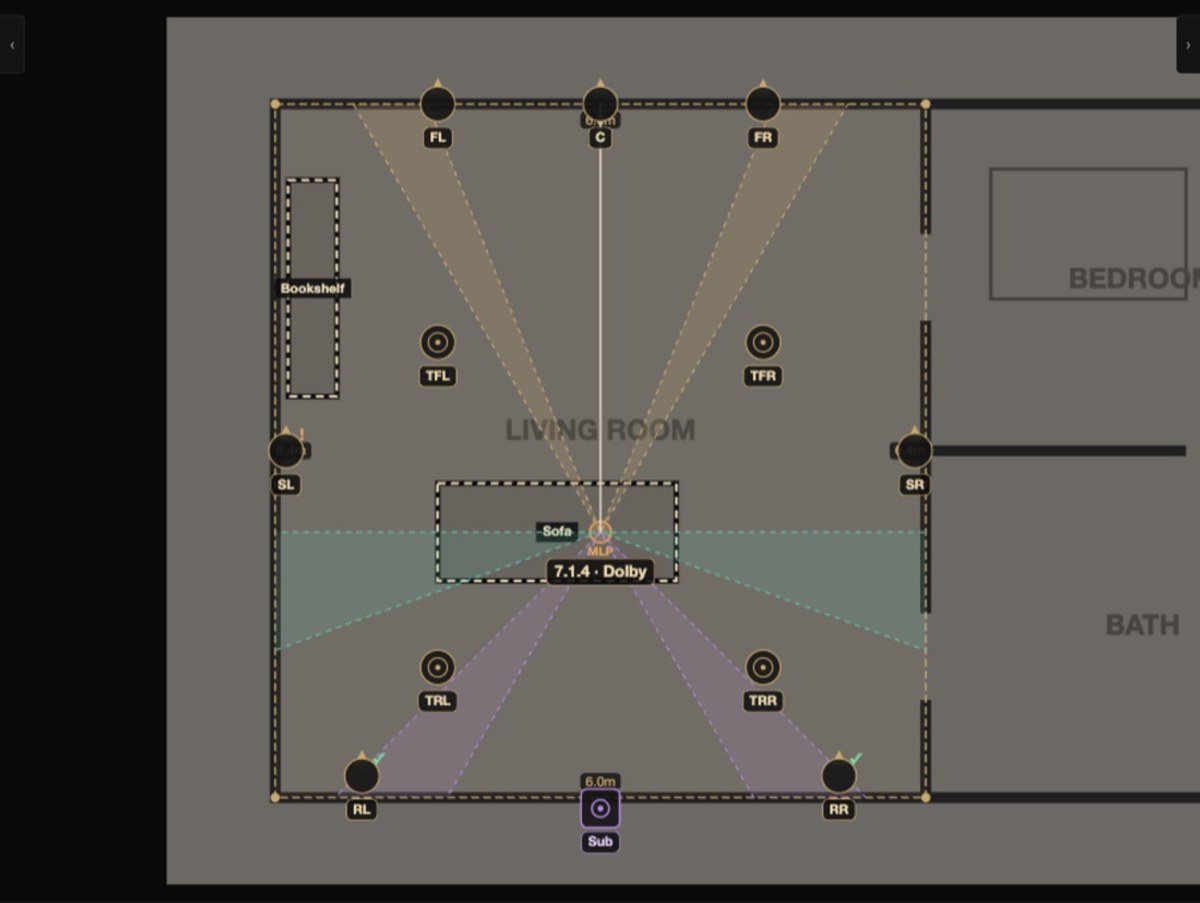
What none of them do is model interference. They place speakers correctly and show you the geometry. They do not compute what happens when the sound from those speakers arrives at a seat and sums — which is where comb filtering, cancellation and the seat-to-seat bass problem live.
The thing that decides whether a cinema works
A cinema fails in predictable ways, and almost none of them are layout errors.
- Bass that is strong in one seat and hollow in the next. Equalisation cannot fix this, because the two seats need opposite corrections.
- A back row that hears the surrounds from the wrong angle because one pair cannot serve two rows.
- A room so heavily treated it sounds dead, which fails the brief as surely as a bright room does.
- Dialogue that drifts off the screen for anyone not sitting on the centre line.
Every one of those is a sound-field problem rather than a placement problem, and every one is cheap to fix while the room is a drawing and expensive afterwards.
Where Floorplan Sound Simulation fits
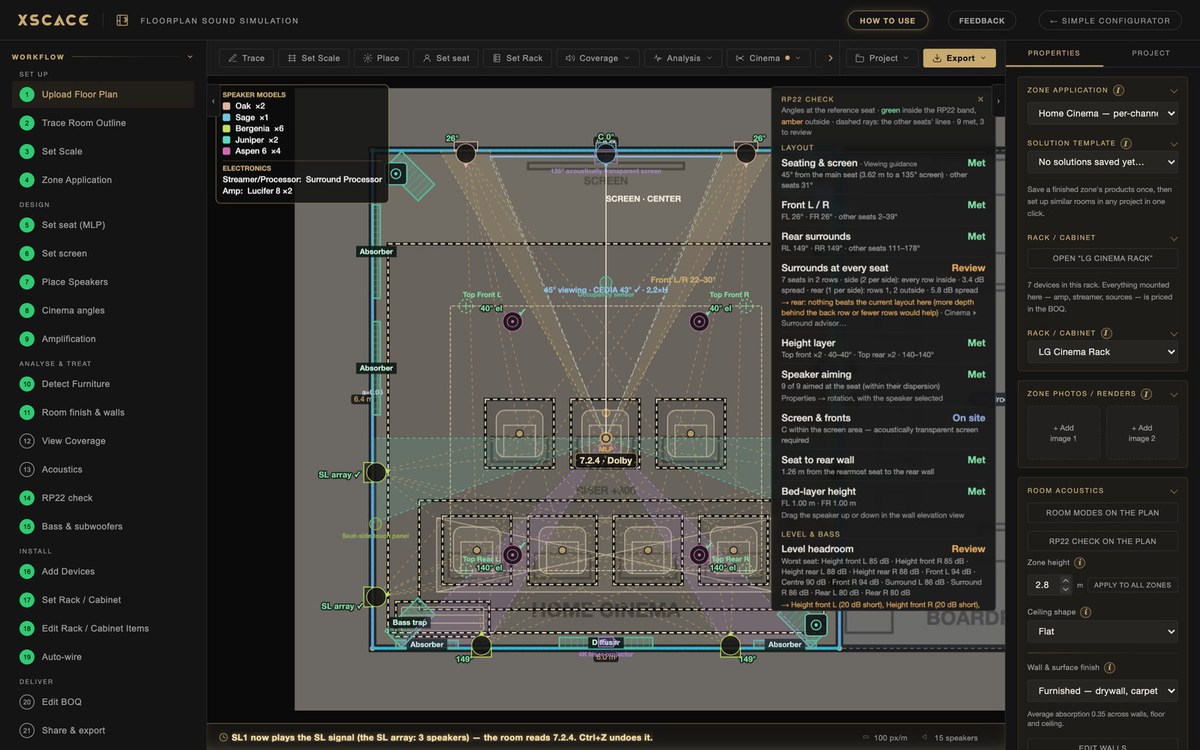
XSCACE's Floorplan Sound Simulation is a browser tool for designing audio across a whole building — music zones, commercial spaces, outdoor areas and cinemas. The cinema work is a part of it rather than the whole of it, and it is the part that has grown most this year.
For a cinema specifically, it does four things the tools above do not:
- Coherent SPL prediction. Every speaker is summed in phase across Low, Mid and High bands, so reinforcement and cancellation appear where they will actually happen — on an absolute dB scale, not a relative coverage blob.
- Room modes to 200 Hz — axial, tangential and oblique — with boom and null flagged at the listening position, plus a multi-subwoofer advisor that ranks layouts by seat-to-seat spread.
- CEDIA/CTA RP22 checking, run live as you design. Angles are judged at the main seat and shown as a range across the others, and the surrounds get their own every-seat check for rooms with more than one row.
- Walls built the way they will be built — layer by layer, fabric over mineral wool, drywall over an insulated cavity — with per-band finishes, shaped ceilings and structural columns that block sound rather than being ignored.

Two rows change the problem
Most free tools assume one row, or treat a second row as a second set of coordinates. In practice a second row is where cinema designs fail: one pair of side surrounds cannot keep both rows inside the reference angle band, and the back row ends up hearing the surround from behind its own ear line.
The surround advisor works out the fewest speakers per side that keep every row in the band, marks the recommended layout, and places it. Seat angles shows where each seat hears each surround from, with every seat at its own ear height on its riser. Added speakers can be told to share one surround signal, so the channel count, the amplifier channels and the RP22 check all stay correct rather than silently inflating the format.
What the modelling is worth, in one number
From a nine-zone project designed this way: with the two subwoofers originally drawn, the model predicted 11.9 dB of seat-to-seat spread across 20–200 Hz. Four subwoofers in the four corners — the intuitive answer — came out at 8.5 dB. Four at the middle of each wall came out at 5.8 dB, inside the 6 dB RP22 asks for.
The correct answer was not the intuitive one, it was nearly three decibels better than the instinct, and it cost nothing because the walls were still drawings. That is the entire argument for predicting rather than placing.
When not to use it
Worth being direct, because a tool that claims everything is harder to trust on what it does do.
- If you are one person planning one room and you want to see it in 3D quickly, Audio Advice is faster and friendlier, and it is free. Use it.
- If what you need is CAD drawings and installer documentation as the primary output, a tool built around documentation will serve you better.
- It needs a mouse and a wide screen. Phones and tablets get a notice rather than a cut-down editor that would produce sloppy geometry.
- It is not a full wave solve. It models modes to 200 Hz and coherent summation above that, which is a prediction, not a physics simulation.
- It is made by a speaker manufacturer, and the XSCACE catalogue is built in. Other manufacturers' products are available with Pro. That bias is worth knowing — although every tool in this category is published by someone with something to sell.

Watch the parts that matter
Each of these is a short episode showing the feature working on a real project rather than a feature list.
- Surrounds for Every Row — 1:33. Two rows, seat angles, and the advisor placing the fewest speakers that keep every row in the band.
- EP 28 · Bass and Multiple Subs — 2:10. Why one seat booms and the next does not, and how the multi-subwoofer advisor ranks the fixes.
- EP 17 · Room Modes and Schroeder — 2:10. The standing-wave field shaded over the plan, and where the Schroeder transition falls.
- EP 30 · The 3D View — 2:52. Coverage laid on the listening plane at ear height, in Low, Mid or High, with the waterfall and coverage shell.
- EP 14 · Per-Wall Acoustics and Layered Walls — 2:13. Building a wall layer by layer and watching the decay move toward the target.
- EP 26 · Bands and Sum Modes — 2:18. One coverage map, three bands, and three ways of summing speakers together.
There is a full course on the XSCACE Audio channel, from an empty screen through to a client link.
Getting to a quote
The design is only half of it. The same model produces a bill of quantities per zone, a client report that adapts to whether the room is music or cinema, an Excel quotation that round-trips your own prices, and a private client link with an interactive 3D model instead of a PDF attachment. There is a full walkthrough of the workflow in the journal.
It is free to use in a browser, with no account required to design.