Contents8 sections
The XSCACE Floorplan Sound Simulation can now be driven by an AI assistant. Connect Claude, or any assistant that speaks the Model Context Protocol (MCP), to your XSCACE account, describe the room in plain language, and the assistant traces the floors, places the speakers, checks a cinema against CEDIA/CTA RP22, prices the bill of quantities and creates the client presentation link. It does all of this through the configurator’s own engine, so every result opens in the configurator for you to check and adjust. The MCP server has been live since 5 October 2026 and was connected end to end in Claude on 6 October: it created a project, priced it and produced a client link.
What MCP is, in one paragraph
The Model Context Protocol is an open standard that lets an AI assistant call tools on another service with your permission. Instead of copying numbers between a chat window and a design tool, the assistant works inside the tool. For the XSCACE configurator that means the assistant can create and edit projects, run the acoustic analysis and generate the documents a dealer sends a client, while the configurator stays the single source of truth. The connection is authorised by you, it is scoped to your account, and it can be revoked at any time.
What an assistant can do with the XSCACE configurator
What it can do depends on how you are signed in. Without an account, the catalogue and the calculators are open. With an account, your projects are available. With Pro, the assistant can design.
- No account: search the catalogue and read product specifications, run the room acoustics calculator, size speaker cable by length and impedance, and preview a design without saving it.
- Signed in: list and open your existing projects.
- Pro: create and edit projects, including cinema seating on risers, layered walls, screens, surround arrays, electronics, racks and wiring; run the acoustic and readiness analysis; produce the bill of quantities at your selling prices; create client presentation links; keep project backups.
- Never: see your costs, margins, passwords or billing, or delete a project. A backup is kept before every edit.
How to connect Claude
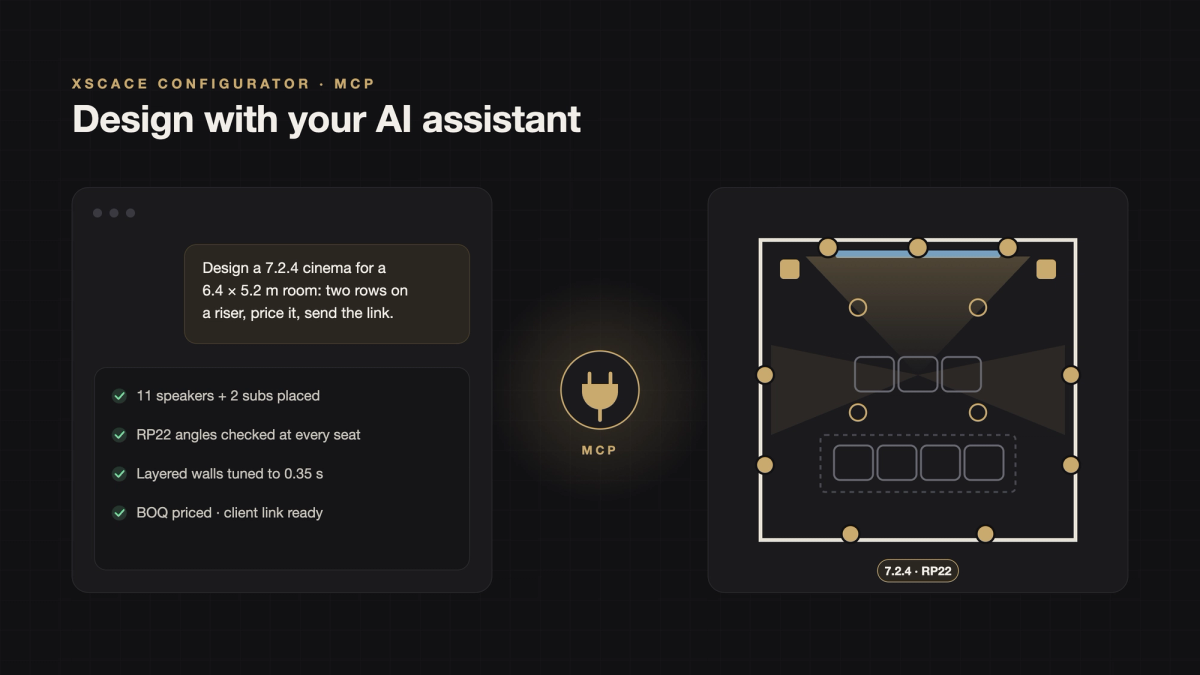
In Claude on the web or the desktop app, open Settings, then Connectors, and choose Add custom connector. Paste the address https://configurator.xscace.com/mcp. Claude opens the XSCACE sign-in page; sign in and click Allow. From then on you can ask, for example, “Design a 7.2.4 cinema for a 6.4 by 5.2 metre room, two rows on a riser, price it and send me the client link.” The assistant returns the configurator link with the design, the RP22 check at every seat, the reverberation target and the priced bill of quantities.
How to connect Claude Code and other MCP tools
Open the setup page at configurator.xscace.com/mcp-connect and create a personal key. The key is shown once. Then add the server to your tool with the address https://configurator.xscace.com/mcp and the key as a Bearer authorisation header. In Claude Code the command is: claude mcp add --transport http xscace https://configurator.xscace.com/mcp --header "Authorization: Bearer xsk_…". Other MCP clients use the same address with either sign-in or the key.
Using it without an account
The public endpoint at https://configurator.xscace.com/mcp/public needs no sign-in. It exposes the product catalogue, the room acoustics calculator, the cable gauge calculator and design previews. Saving projects, generating quotes and creating client links need an account with Pro.
What a typical request looks like
A dealer describes a room: dimensions, ceiling height, how many seats, which products they prefer, and what the client cares about. The assistant creates the project, traces the room at the stated scale, places the speakers according to the chosen layout, runs the coverage prediction across the low, mid and high bands, checks the channel angles against RP22 at every seat, tunes the wall layers to the reverberation target, prices the bill of quantities from the dealer’s saved price list, and produces a read-only client link. The whole exchange takes a few minutes, and every number in it is the configurator’s own arithmetic, not the assistant’s guess.
Why the configurator does the work, not the assistant
Large language models are good at understanding a brief and bad at acoustics. The MCP connection keeps those roles separate. The assistant interprets the request and calls the right tools; the configurator does the image-source reflections, the coherent phasor summation, the Eyring reverberation and the RP22 geometry, exactly as it does when you click. That is why the results are reproducible and why the page the client sees is the same one you would have built by hand.
Where to find it
Connect an assistant at configurator.xscace.com/mcp-connect.